* CloudFormation이란 무엇인가
CloudFormation은 IaC(Infrastructure as Code) 기반으로 AWS 인프라 리소스를 자동으로 생성하는 서비스이다.
VPC, EC2 등 리소스를 수동으로 생성할 필요 없이 리소스들을 템플릿(코드)으로 구성하고,
스택을 생성하여 해당 서비스의 프로비저닝과 설정을 미리 구성할 수 있다.
또한 생성된 템플릿을 재사용하거나 수정해서 활용할 수 있고,
리소스 간 종속성을 수동으로 관리하는 것보다 훨씬 안정적이며 변경 사항을 추적할 수 있다.
1. CloudFormation으로 기본 인프라 자동 배포

[CloudFormation] - [스택] - [스택 생성]

기존 템플릿으로 지정해 줬다.
(템플릿 파일 내용은 글 마지막에 첨부함)

스택 이름과 키페어를 지정하고 [다음[-[전송]을 눌러 스택을 생성한다.

스택이 생성된 것을 확인할 수 있다.
인프라 배포가 정상적으로 완료(CREATE_COMPLETE)되기까지 5분 정도 걸린다.
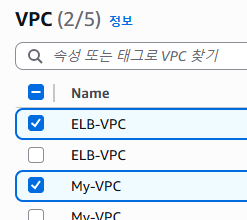

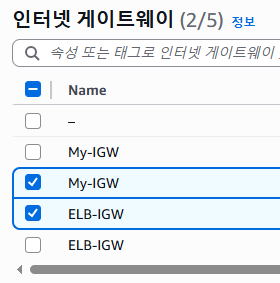


배포가 끝나고 VPC, EC2 인스턴스 등 인프라 자원이 생성된 것을 확인할 수 있다.
2. CloudFormation으로 패포한 기본 인프라 환경 검증

생성된 SERVER1 인스턴스에 접속하였다.

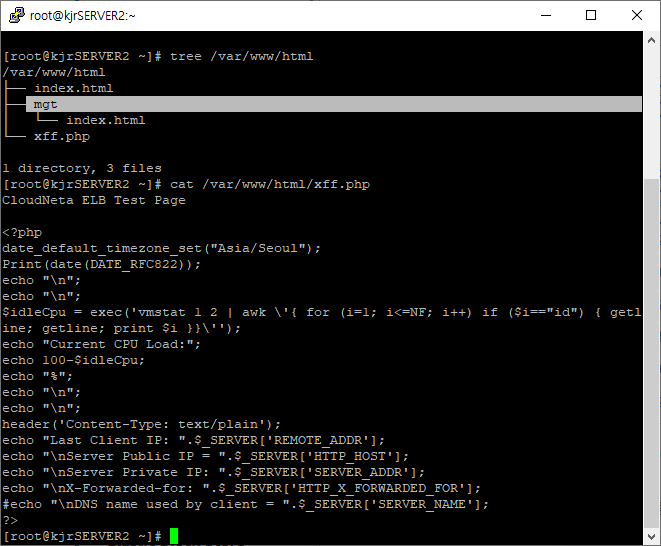
SERVER1, SERVER2에 설치된 파일을 확인한다.

SERVER 1, 2, 3으로 HTTP와 SNMP 서비스를 확인하기 위해,
각 서버의 퍼블릭 IP를 변수에 지정하였다.
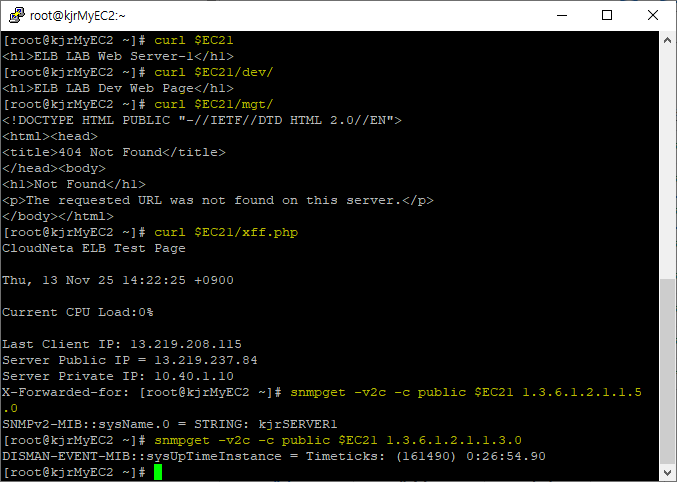
curl 명령으로 SERVER1의 웹 서비스를 확인하고,
snmpget 명령으로 SNMP 서비스를 확인하였다.
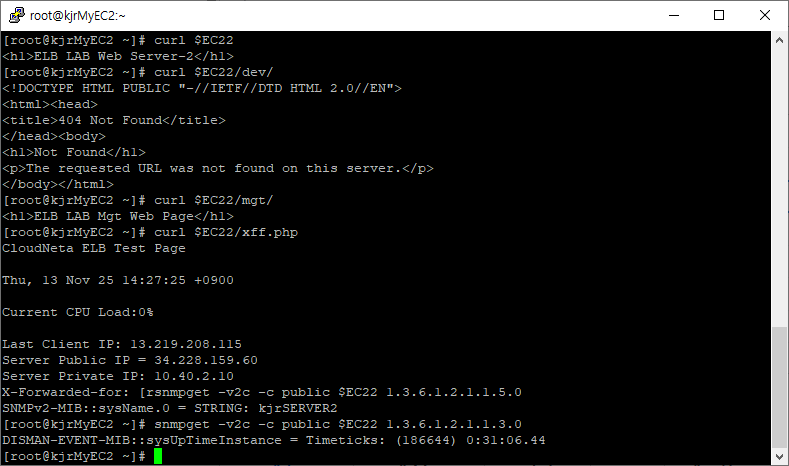
SERVER2의 웹서비스와 SNMP 서비스도 잘 동작하는지 확인하였다.
인프라가 잘 구성된 것 같다.
끝...
# JSON (템플릿)

Parameters:
  KeyName:
    Description: Name of an existing EC2 KeyPair to enable SSH access to the instances. Linked to AWS Parameter
    Type: AWS::EC2::KeyPair::KeyName
    ConstraintDescription: must be the name of an existing EC2 KeyPair.
  LatestAmiId:
    Description: (DO NOT CHANGE)
    Type: 'AWS::SSM::Parameter::Value<AWS::EC2::Image::Id>'
    Default: '/aws/service/ami-amazon-linux-latest/amzn2-ami-hvm-x86_64-gp2'
    AllowedValues:
      - /aws/service/ami-amazon-linux-latest/amzn2-ami-hvm-x86_64-gp2

Resources:
# VPC
  KJRELBVPC:
    Type: AWS::EC2::VPC
    Properties:
     CidrBlock: 10.40.0.0/16
     EnableDnsSupport: true
     EnableDnsHostnames: true
     Tags:
        - Key: Name
          Value: kjrELB-VPC

  KJRMyVPC:
    Type: AWS::EC2::VPC
    Properties:
     CidrBlock: 20.40.0.0/16
     Tags:
        - Key: Name
          Value: kjrMy-VPC

  ELBIGW:
    Type: AWS::EC2::InternetGateway
    Properties:
      Tags:
        - Key: Name
          Value: kjrELB-IGW

  MyIGW:
    Type: AWS::EC2::InternetGateway
    Properties:
      Tags:
        - Key: Name
          Value: kjrMy-IGW

  ELBIGWAttachment:
    Type: AWS::EC2::VPCGatewayAttachment
    Properties:
      InternetGatewayId: !Ref ELBIGW
      VpcId: !Ref KJRELBVPC

  MyIGWAttachment:
    Type: AWS::EC2::VPCGatewayAttachment
    Properties:
      InternetGatewayId: !Ref MyIGW
      VpcId: !Ref KJRMyVPC

  ELBPublicRT:
    Type: AWS::EC2::RouteTable
    Properties:
      VpcId: !Ref KJRELBVPC
      Tags:
        - Key: Name
          Value: kjrELB-Public-RT

  ELBDefaultPublicRoute:
    Type: AWS::EC2::Route
    DependsOn: ELBIGWAttachment
    Properties:
      RouteTableId: !Ref ELBPublicRT
      DestinationCidrBlock: 0.0.0.0/0
      GatewayId: !Ref ELBIGW

  MyPublicRT:
    Type: AWS::EC2::RouteTable
    Properties:
      VpcId: !Ref KJRMyVPC
      Tags:
        - Key: Name
          Value: kjrMy-Public-RT

  MyDefaultPublicRoute:
    Type: AWS::EC2::Route
    DependsOn: MyIGWAttachment
    Properties:
      RouteTableId: !Ref MyPublicRT
      DestinationCidrBlock: 0.0.0.0/0
      GatewayId: !Ref MyIGW

  ELBPublicSN1:
    Type: AWS::EC2::Subnet
    Properties:
      VpcId: !Ref KJRELBVPC
      AvailabilityZone: !Select [ 0, !GetAZs '' ]
      CidrBlock: 10.40.1.0/24
      Tags:
        - Key: Name
          Value: kjrELB-Public-SN-1

  ELBPublicSN2:
    Type: AWS::EC2::Subnet
    Properties:
      VpcId: !Ref KJRELBVPC
      AvailabilityZone: !Select [ 2, !GetAZs '' ]
      CidrBlock: 10.40.2.0/24
      Tags:
        - Key: Name
          Value: kjrELB-Public-SN-2

  MyPublicSN:
    Type: AWS::EC2::Subnet
    Properties:
      VpcId: !Ref KJRMyVPC
      AvailabilityZone: !Select [ 0, !GetAZs '' ]
      CidrBlock: 20.40.1.0/24
      Tags:
        - Key: Name
          Value: kjrMy-Public-SN

  ELBPublicSNRouteTableAssociation:
    Type: AWS::EC2::SubnetRouteTableAssociation
    Properties:
      RouteTableId: !Ref ELBPublicRT
      SubnetId: !Ref ELBPublicSN1

  ELBPublicSNRouteTableAssociation2:
    Type: AWS::EC2::SubnetRouteTableAssociation
    Properties:
      RouteTableId: !Ref ELBPublicRT
      SubnetId: !Ref ELBPublicSN2

  MyPublicSNRouteTableAssociation:
    Type: AWS::EC2::SubnetRouteTableAssociation
    Properties:
      RouteTableId: !Ref MyPublicRT
      SubnetId: !Ref MyPublicSN

# Security Group
  MySG:
    Type: AWS::EC2::SecurityGroup
    Properties:
      GroupDescription: Enable ICMP and SSH access via port 22
      VpcId: !Ref KJRMyVPC
      Tags:
        - Key: Name
          Value: kjrMy-SG
      SecurityGroupIngress:
      - IpProtocol: tcp
        FromPort: '22'
        ToPort: '22'
        CidrIp: 0.0.0.0/0
      - IpProtocol: icmp
        FromPort: -1
        ToPort: -1
        CidrIp: 0.0.0.0/0

  kjrELBSG:
    Type: AWS::EC2::SecurityGroup
    Properties:
      GroupDescription: Enable HTTP and SNMP and SSH and ICMP
      VpcId: !Ref KJRELBVPC
      Tags:
        - Key: Name
          Value: kjrELBSG
      SecurityGroupIngress:
      - IpProtocol: tcp
        FromPort: '80'
        ToPort: '80'
        CidrIp: 0.0.0.0/0
      - IpProtocol: udp
        FromPort: '161'
        ToPort: '161'
        CidrIp: 0.0.0.0/0
      - IpProtocol: tcp
        FromPort: '22'
        ToPort: '22'
        CidrIp: 0.0.0.0/0
      - IpProtocol: icmp
        FromPort: -1
        ToPort: -1
        CidrIp: 0.0.0.0/0

# EC2 Instance
  kjrMyEC2:
    Type: AWS::EC2::Instance
    Properties:
      InstanceType: t3.micro
      ImageId: !Ref LatestAmiId
      KeyName: !Ref KeyName
      Tags:
        - Key: Name
          Value: kjrMyEC2
      NetworkInterfaces:
        - DeviceIndex: 0
          SubnetId: !Ref MyPublicSN
          GroupSet:
          - !Ref MySG
          AssociatePublicIpAddress: true
          PrivateIpAddress: 20.40.1.10
      UserData:
        Fn::Base64:
          !Sub |
            #!/bin/bash
            hostnamectl --static set-hostname  kjrMyEC2
            echo "sudo su -" >> /home/ec2-user/.bashrc
            yum install net-snmp-utils tcpdump tmux -y

  ELBEC21:
    Type: AWS::EC2::Instance
    Properties:
      InstanceType: t3.micro
      ImageId: !Ref LatestAmiId
      KeyName: !Ref KeyName
      Tags:
        - Key: Name
          Value: kjrSERVER1
      NetworkInterfaces:
        - DeviceIndex: 0
          SubnetId: !Ref ELBPublicSN1
          GroupSet:
          - !Ref kjrELBSG
          AssociatePublicIpAddress: true
          PrivateIpAddress: 10.40.1.10
      UserData:
        Fn::Base64:
          !Sub |
            #!/bin/bash
            hostnamectl --static set-hostname  kjrSERVER1
            echo "sudo su -" >> /home/ec2-user/.bashrc
            yum install httpd php -y
            yum install net-snmp net-snmp-utils tcpdump tree tmux -y
            service httpd start && service snmpd start
            chkconfig httpd on && chkconfig snmpd on
            echo "<h1>ELB LAB Web Server-1</h1>" > /var/www/html/index.html
            mkdir /var/www/html/dev
            echo "<h1>ELB LAB Dev Web Page</h1>" > /var/www/html/dev/index.html
            curl -o /var/www/html/xff.php https://cloudneta-aws-book.s3.ap-northeast-2.amazonaws.com/chapter4/xff.php --silent

  ELBEC22:
    Type: AWS::EC2::Instance
    Properties:
      InstanceType: t3.micro
      ImageId: !Ref LatestAmiId
      KeyName: !Ref KeyName
      Tags:
        - Key: Name
          Value: kjrSERVER2
      NetworkInterfaces:
        - DeviceIndex: 0
          SubnetId: !Ref ELBPublicSN2
          GroupSet:
          - !Ref kjrELBSG
          AssociatePublicIpAddress: true
          PrivateIpAddress: 10.40.2.10
      UserData:
        Fn::Base64:
          !Sub |
            #!/bin/bash
            hostnamectl --static set-hostname  kjrSERVER2
            echo "sudo su -" >> /home/ec2-user/.bashrc
            yum install httpd php -y
            yum install net-snmp net-snmp-utils tcpdump tree tmux -y
            service httpd start && service snmpd start
            chkconfig httpd on && chkconfig snmpd on
            echo "<h1>ELB LAB Web Server-2</h1>" > /var/www/html/index.html
            mkdir /var/www/html/mgt
            echo "<h1>ELB LAB Mgt Web Page</h1>" > /var/www/html/mgt/index.html
            curl -o /var/www/html/xff.php https://cloudneta-aws-book.s3.ap-northeast-2.amazonaws.com/chapter4/xff.php --silent

  ELBEC23:
    Type: AWS::EC2::Instance
    Properties:
      InstanceType: t3.micro
      ImageId: !Ref LatestAmiId
      KeyName: !Ref KeyName
      Tags:
        - Key: Name
          Value: kjrSERVER3
      NetworkInterfaces:
        - DeviceIndex: 0
          SubnetId: !Ref ELBPublicSN2
          GroupSet:
          - !Ref kjrELBSG
          AssociatePublicIpAddress: true
          PrivateIpAddress: 10.40.2.20
      UserData:
        Fn::Base64:
          !Sub |
            #!/bin/bash
            hostnamectl --static set-hostname  kjrSERVER3
            echo "sudo su -" >> /home/ec2-user/.bashrc
            yum install httpd php -y
            yum install net-snmp net-snmp-utils tcpdump tree tmux -y
            service httpd start && service snmpd start
            chkconfig httpd on && chkconfig snmpd on
            echo "<h1>ELB LAB Web Server-3</h1>" > /var/www/html/index.html
            mkdir /var/www/html/mgt
            echo "<h1>ELB LAB Mgt Web Page-1</h1>" > /var/www/html/mgt/index.html
            curl -o /var/www/html/xff.php https://cloudneta-aws-book.s3.ap-northeast-2.amazonaws.com/chapter4/xff.php --silent
스택 생성에 사용한 JSON 형식의 템플릿 파일이다.
생성한 자원들, 인프라 속성, 관계, 종속성 등이 정의되어 있다.
'퍼블릭 클라우드(AWS)' 카테고리의 다른 글
| [AWS] EBS(Elastic Block Store) 스토리지 구성 (0) | 2025.11.17 |
|---|---|
| [AWS] ALB(Application Load Balancer), NLB(Network Load Balancer) - 로드밸런싱 구성 (0) | 2025.11.14 |
| [AWS] VPC(Virtual Private Cloud) - Private Subnet 구성 (0) | 2025.11.12 |
| [AWS] VPC(Virtual Private Cloud) - Public Subnet 구성 (0) | 2025.11.12 |
| [AWS] EC2 - 인스턴스 배포 및 웹 서비스 접속 (0) | 2025.11.11 |